
Global Clipboard2.3 - Download
You'll be able to download in few seconds.
Publisher Description
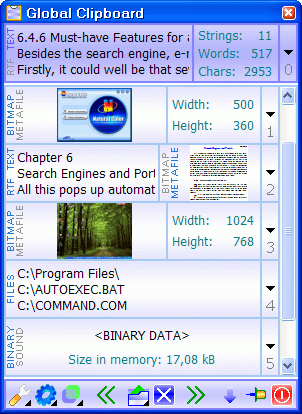
Global Clipboard is a multifunctional clipboard manager. The program saves all the information that is copied to the clipboard. Therefore, you can restore any data used during your work. A flexible interface and convenient viewing make it possible to receive all the information on each data fragment.
Global Clipboard allows filling in forms easily, because it keeps a list of necessary information that is always visible. Now you can see the number of strings, words and symbols of the copied text, and also the sizes of images or screenshots. With this program, you can use the clipboard to merge texts copied from different applications.
During the next work session all the contents of the clipboard and all data fragments will be restored, so that you could continue the work quickly. You can change the case of the text and transform images in the clipboard by pressing a hotkey. To write a message or open a link, now you should just copy the address, and Global Clipboard will launch the necessary application itself.
The large number of parameters will allow you to customize the program in order to increase the productivity to a considerable extent and simplify the work. The program has a multilingual interface that will allow you to use your native language when you work with it.
About Global Clipboard
This Clipboard Tools program is available in English, ChineseSimplified, Croatian, Czech, French, German, Polish, Portuguese, Romanian, Russian, Slovak, Spanish, Ukrainian. It was last updated on 29 September, 2026. Global Clipboard is compatible with the following operating systems: Windows.
The company that develops Global Clipboard is ElasticLogic. The latest version released by its developer is 2.3.
The download we have available for Global Clipboard has a file size of 1.0 MB. Just click the green Download button above to start the downloading process. The program is listed on our website since 2010-04-26 and was downloaded 0 times. We have already checked if the download link is safe, however for your own protection we recommend that you scan the downloaded software with your antivirus. Your antivirus may detect the Global Clipboard as malware if the download link is broken.
How to install Global Clipboard on your Windows device:
- Click on the Download button on our website. This will start the download from the website of the developer.
- Once the Global Clipboard is downloaded click on it to start the setup process (assuming you are on a desktop computer).
- When the installation is finished you should be able to see and run the program.
Program Details
General
System requirements
Download information
Pricing
Version History
version 2.3
posted on 2010-04-26
Compatibility with Windows 7 and Vista.
Updated Romanian translate.
Added French translate.
version 2.2
posted on 2007-02-26
Improved compatibility with other clipboard managers.
New interface languages: Polish, Portuguese.
Optimized program window painting.
Changed registration keys type.
Other little changes.
Disclaimer
External Download
We do not host Global Clipboard on our servers. We did not scan it for viruses, adware, spyware or other type of malware. This app is hosted by the software publisher and passed their terms and conditions to be listed there. We recommend caution when installing it.
The external download link for Global Clipboard is provided to you by apps112.com without any warranties, representations or guarantees of any kind, so access it at your own risk.
If you have questions regarding this particular app contact the publisher directly. For questions about the functionalities of apps112.com contact us.
